Wednesday, May 20, 2009

Stocks, Flows, and Upkeep in Social Media

Last week a few folks including Michael Nielsen and I conducted a little experiment on Drawball. In case you don't know about Drawball, it is a kind of a "collaborative art" site where you are given a certain amout of "ink" which you can use to draw wherever you like on a gigantic, but shared, canvas. Your ink replenishes slowly, so you pretty much have to take breaks. Which is good if you have obsessive tendencies.

I find Drawball interesting because it provides a visualization of community dynamics. You see, some people go there and try to create nice things. Others are bent on destroying any and all nice things. People team up, so they can think big - and draw big. There are (good and evil) mobs. There are turf wars. There is drama.

The action on the ground is perhaps best described as ferocious pixel warfare. If you're wondering what the process looks like from 30,000 feet, watch this (there's a better quality video here):


I believe Drawball One is by now pretty much covered in protected areas that no one can overwrite, as a result of a preservation effort by the site's mastermind; On Drawball Two, however, it's the wild wild west.

Okay. On to our experiment. First we drew and colored in an "impossible triangle" of modest size. This didn't take too long and was not really difficult. Surprisingly, maybe owing to its small size, it stayed nice and clean for a few days.

Then we got started on something more ambitious: a fractal shape called a Sierpinski gasket. I picked this shape because it could grow without bounds from a small seed, and I figured its simplicity would make it relatively easy to repair, even for someone who didn't know exactly what it was. You can see the initial effort to the right.

Very quickly we had a budding replica of the seed, and one of the largest solid black areas on drawball. I think someone working alone would have taken a few days to do this, taking ink refill delays into account.


By the next day we had a pretty nice start. The shape had grown to a size that was noticeable on the whole-ball view (without magnification).

And that's when some vandals noticed us. They actually organized raids against our glorious gasket. Ink limitations mean raids are the only way to get any serious harm done quickly on Drawball. The bottom picture shows what the gasket looked like on day three. Nature abhors a vacuum, and those empty triangles obviously just looked too tempting.


Now, there is no revert button on Drawball like there is on Wikipedia; every vandalized pixel requires a pixel of repair. We didn't really try to fight the vandals. It was easy to redraw outlines, but filling in the shapes again is time- and ink-consuming.

The experiment is pretty much over by now. The only interesting thing that is left to do is to observe and measure decay. The structure is large and regular enough that I don't expect that it will vanish too soon, but it will definitely get dirtier every with every passing day. You can visit the region today and see if you recognize anything.

So, what have I learned? Well, the first tentative "Drawball law" that becomes apparent very quickly is this:

Drawball Law no. 1. Noticeability brings attention; attention brings participation.

A second law would be:

Drawball Law no. 2.
The effort required for upkeep grows in proportion to the surface area of your turf.
On Drawball strength lies in numbers, not finesse; consequently, if one person is able to maintain a drawing of area X, it will take two people to maintain an area 2X.

Beyond Drawball

How general are these laws? I suspect their applicability goes beyond Drawball. Here's an application of Law no. 2 to wikis and blogs.

To any social media site there is a visitor-editable, "living" part and a non-editable, "still" part. The living portion of a weblog is typically the very edge of the flow - the "now"; the rest of it is still life. For a wiki, the living portion is essentially the whole site (though at any moment some parts are typically more alive than others).

Now, the content of most blogs arguably feels more well-kept than most (open) wikis, even though wikis have a whole community around them and blogs typically have a single maintainer. Why is this?

I believe there are several underlying reasons, but I'm wondering if the chief one might not follow from Drawball Law no. 2. Wiki builders expand their turf with every paragraph added, each page created. If the community doesn't grow with the wiki, its turf becomes unmaintainable. By contrast, as a blog grows, its past content becomes museum material - it quickly fossilizes and requires very little upkeep.

To conclude using the terminology of stocks and flows, I would assert that as a general rule, participative flows (blog-like media) are easier to maintain than participative stocks (wiki-like media).

I leave design-for-community implications as an exercise for the reader. :)

What do you think?


More reading about drawball:

Friday, May 15, 2009

Citizen Science at SciBarCamp II: Semantic Eco-Blogging!

At the last SciBarCamp, Joel Sachs from the SPIRE team at university of Maryland presented a very inspiring project that opens environmental/bioscience in a way that enables regular people to get involved usefully.

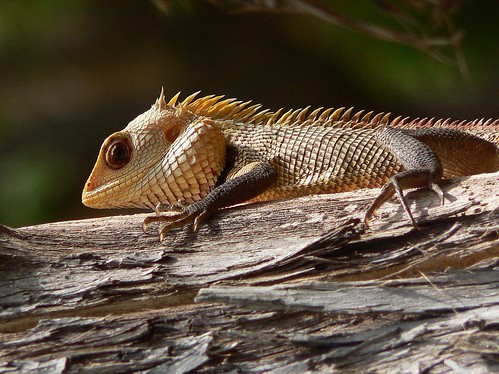
Garden Lizard (best viewed large) First, a bit of background. Every living species has a certain geographic distribution that is known to evolve over time, especially in recent years due to global warming. This data is extremely useful for environment scientists. As you might expect, though, comprehensively cataloging which species live where is a monumental undertaking, especially if you have to repeat the effort every year!

Now, most people nowadays have digital cameras and internet access. Some gadget freaks actually have both, plus a global positioning system (GPS), all in a neat package, which makes it ultra-easy for them to go out in the woods and snap pictures of plants and animals around them. Special days called BioBlitzes have emerged recently where many people go out all at the same time but in different locations, to do just that. Then they report what they found on their respective blogs.

So where and how does it feed into science? Well, Sach's project provides Spotter, a Firefox extension, and a spreadsheet-to-RDF utility called RDF123, that together enable participants to easily do all of the following:
  • Snap a picture of a specimen;
  • Upload it to Flickr;
  • Provide geographic information on where the photo was taken;
  • Tag it with descriptive terms, as specifically as they can;
  • If needed, request further crowdsourced identification (volunteers can watch RSS streams corresponding to certain tags like "bird" or "butterfly").
Faithful readers of mine (who have good memory!) will recognize this as a neat incarnation of that old structured blogging idea. The result of each contribution is stored in the RDF representation on a central aggregating database managed by SPIRE. This enables semantic queries to be made, such as: "Show all observations of species that are classified as being of concern by the U.S Fish and Wildlife Service" or "What was the northernmost spotting of the Emerald Ash Borer last year?".

The overall result is obviously a global, collaborative database of samples from everywhere that gets richer with each participant's contribution. For participants, obvious motivations include:
  • an interest in natural observation (think about birdwatchers);
  • the satisfaction of contributing to a worthwhile scientific endeavor;
  • the pride of offering something quite unique (info sampled at your particular location).
I could totally picture 6th grade classes going out and having a blast doing this. (If you're an educator reading this, think about doing it!)

So far there are about 1200 observations in the system, but hopefully this number will grow as more people join the effort. I don't know too much about the viral properties of participation, but for starters, the fact that photos are posted into each people's Flickr stream exposes the project to their friends.

All in all, I think this is a very promising effort that exemplifies how amateurs and pros can complement each other given the right tools. There are obvious parallels to draw between this effort and other citizen science endeavors such as GalaxyZoo, which harnesses people's ability to classify galaxies better than computers, or the OpenStreetMap project, which aims to create free datasets of where streets are everywhere in the world.

Monday, May 11, 2009

SciBarCamp II, Toronto

I'm writing this on the train back from SciBarCamp II in Toronto.

To briefly sum up the experience, I've just spent an intense 24 hours in the company of quite a few admirable thinkers.

As the name suggests to people who know about BarCamps, the event was set up as an unconference. Attendance was on invitation and limited to a hundred participants. The chosen theme was "Open Science".

It really felt like the organizers knew what they were doing. No time was wasted. Pretty much all of the participants (two thirds of whom actually weren't at the first SciBarCamp) slipped seamlessly into the unconference mold.

IMG_7360.JPG by EasternblotThe participant makeup was quite diverse, with maybe half of the participants being scientists and others being businesspeople, technologists and artists with a strong interest in science. I was struck by the all-around open-mindedness and ability to speak in a jargon-free manner.


The event went as follows: At the Friday evening reception, we spent 30 minutes on personal introductions, then had a mix & mingle session where people basically talked to whoever they liked, and filled in session proposal sheets. Around 30 such sheets were filled in. Then, participants were invited to go around the sheets and were able to comment on them and indicate interest by filling in circles below the session descriptions.

The interest indicators enabled the organizers to build Saturday's schedule on the fly. Rooms were allocated to sessions, with the more popular sessions obviously being put into larger rooms. A few proposals were merged together. The final schedule had five one-hour time slots, with 5 parallel sessions underway at any one time.

You can have a look at the schedule here. Two sessions especially stood out for me. The first was Joel Sachs and Jesse Greener's session on citizen science. The second was Michael Nielsen's talk on open mass collaboration in mathematics. I will cover them in upcoming posts.

I especially appreciated the opportunity to meet again with WorldChangers Hassan Masum, Mark Tovey and Karl Schroeder, and I was stoked to shake hands with quantum-information-authority-turned-science-futurist Michael Nielsen for the first time. It was also a great pleasure to meet new people like physicist Rob Spekkens and Kaitlin "I am not a lawyer" Thaney from Science Commons.

Huge kudos to Eva Amsen, Christine Buske, Jen Dodd, Jamie McQuay, Mark Tovey and Sunny Tsang, who pulled this event off, well, flawlessly on a shoestring budget.

I think a Montreal SciBarCamp will obviously need to happen at some point. However, it feels like the requisite network has yet to gel together. (Either that, or I haven't connected to it for some reason.)

Update: Here is Glendon Mellow's report on SciBarCamp.

Thursday, April 30, 2009

Quick Guide: Four Easy Ways to Protect your Gmail Account

Logo GmailIf you are using Gmail as your main email account, you'll readily admit that you'd be in a tough spot if you were to lose access to it. But these things do happen, be it because you forgot your password (most likely right after changing it!) or because your archenemy (or some random joker) has been able to hijack your account. Hey, if it happened to Kanye, it could happen to anyone :)

If you have registered for various services on the web using your Gmail account, things could get really messy. "I forgot my password" links would no longer be of any use, as they send help to an account you can no longer enter. Moreover, a hijacker could use your Gmail as a gateway to gain access to your accounts on those services.

The long and short of it, really, is that it would be best if you didn't lose your Gmail account.

I did a quick search today to see what precautions I could take to protect against this and found out que you and I can reduce risks in four easy ways. (The links below work for me today; your mileage may vary.)
  1. Always use the secure https protocol (look at the bottom of the page) to communicate with Gmail.
  2. Make sure you have chosen a secret question to get your password back.
  3. Make sure you have entered a secondary address in your Gmail settings.
  4. Pick a password that is not easy to guess.

In this guide you can find additional info, including a discussion of what your options are if you find yourself in the unfortunate position of having lost access to your account.

Tuesday, February 24, 2009

What Physics and Computer Science Taught Me About Thinking

Back in the day, as a student, I had the opportunity to study two scientific disciplines. Beyond giving me a solid grounding in each field, these studies actually taught me a thing or two about thinking. These are actually the most valuable pieces of wisdom I got from nearly a decade of higher education.

Pendulum, Diagrammed First, physics taught me that, very often, the way you look at a problem determines how easy or hard it will be to think about it and solve it. When doing physics assignments, I would often spend about 3/4 of the time manipulating the problem statement to find a formulation that made its subsequent resolution straightforward. Very often the calculation ended up being trivial compared to what it would have been using a different representation. I challenged myself to make my weekly writeup fit comfortably on a single sheet of paper without cutting out detail, and I often succeeded.

I learned from physics that it is often best not to rush in to solve a problem. The time you invest in really understanding a problem is typically given to you back several-fold:
  • It simplifies the problem at hand;
  • It creates new learning in your mind, which will make subsequent similar problems easier to tackle.
Second, computer science taught me that there are many ways to skin a cat. Programming is essentially a communication challenge. It is about clarifying initially fuzzy concepts and relations and representing them in code. The way you do this determines how much or how little trouble you're setting yourself up for.

Again, the representation you choose matters, but not quite in the same way that it matters in weekly physics assignments. You're not trying to knock a particular ball out of the park. In a software project you're typically trying to design pieces that will interact together and that you will be using to build larger pieces still.

Of courses the pieces have to "work", but great design means that they have a special quality beyond just being correct: they're easy to understand and use. And they will still be easy to understand in use six months from now, when you return to that code after having been busy with something else. Or when someone else dives into your code.

An operating principle here is to make everything as simple as possible, but not simpler. It usually takes work to get there, but it is amply rewarded in the long run.

To summarize: doing physics and computer science, I learned about the value of making the effort to make things simple. (as Mark Pilgrim said: "A lot of effort went into making this effortless")

Now, the great thing about it is that lessons learned about thinking are applicable wherever there is thinking involved, which is a pretty wide domain of applicability when you think about it. In a future post I want to explore how these principles influence the impact and diffusion of ideas, whether they be theories, methodologies, memes, or musical themes.

Friday, February 13, 2009

Canada's Top 10 Digital Thinkers?

Hugh McGuire is wondering who might be "Canada's top 10 digital thinkers - the people who are writing, or doing, the most innovative digital stuff in the country?". Chime in with your suggestions over there.

Friday, February 6, 2009

9 Ways to Face the Perils of Cloud Computing

The cloud *might* go up in smoke.
Are you sitting on it? Be smart.


I like to think I'm pretty cautious when it comes to safeguarding my stuff, but I admit I was taken by surprise when the spiffy, cluefully designed social bookmarking system ma.gnolia underwent a pretty catastrophic FAIL event a little more than a week ago.

Meaning: The service went down. And: the data (about half a terabyte of it) was lost. And: there was a backup, but it went down the drain, too.

What happen? Did somebody set us up the bomb? Actually, no. The file system got corrupted, which in turn corrupted the database backup. Ma.gnolia founder Larry Halff has admitted his backup system wasn't robust enough.

Larry must have had a hell of a week. This event is of course bad enough for him and for ma.gnolia, but it is also a nightmare scenario for the heavy users who had thousands of links, annotations and ratings in there.

On a personal level, I had been collecting bookmarks there for a social software course that I'm developing. While I hadn't stored a zillion links in ma.gnolia, it's still a disappointment. But really, I should have known better than to assume that the services I rely on were properly backed up and just couldn't melt down or disappear. As Christopher Null writes, "you can't trust an online service any more than you can trust your hard drive not to crash. Sure, the vast majority of the time everything will be fine, but eventually all technology products fail, and even the best safeguards are often imperfect."

From a user standpoint, there are two things to think about regarding incidents like these. The first obvious one is how to recover from such a loss, and the second one is how to guard against eventual occurrences. Let's look at each one in turn.

A. The service died on me! What now!?

It turns out that there might be a couple ways to at least partially recover when your content vanishes.
  1. Google and other search engines keep cached copies of publicly accessible web pages. If you're lucky, the googlebot will have crawled and saved a copy of pages with your content. Identify keywords that appeared on your pages or in URLs. Then do a search within the site and click the "Cached" links in the search results. (I found a few of my lost bookmarks that way.)
  2. The Internet Archive crawls the Web and makes what it found available a few months later through its Wayback machine. You may find some of your older stuff there, though in my experience the archive is quite incomplete (for good cause, if you consider the size of the Web!).
  3. Some of the aggregators out there might have picked up your content if it was available as a feed. Here's an example: The excellent Microcontent News weblog had a short life, but the site has been all but dead for several few years. However, Bloglines still has a copy of the feed, as it was left in 2003. (Unfortunately this one was a teaser feed, with only the first sentence of each post; had it been a full feed, the content would be there.) Over at HubLog, Alf Eaton has explained how to get at a feed's historical items using the Google Reader API.
  4. Some sites republish feeds for fun and/or profit. Even if your original feed is no longer accessible, you may find traces of your content elsewhere. To find it, take a clue from Obi-Wan: Use the Search, Luke.
B. How do I protect against an eventual meltdown?

Here are five ways to minimize the impact of a service going down on the ground:
  1. Use several services redundantly. For instance, social bookmarking service Diigo has a feature baked in that lets you post to multiple services. If one goes down you still have your links in other places.
  2. Save local copies to your hard drive. For pictures and videos, you usually start from a drive, so this is a non-issue. But for blogs and social bookmarks, very often the "original" copy is stored with the service you're using. If it offers integral exports, use them. If not, local backup is less practical -- but have a look at #3.
  3. Produce full feeds of your content and subscribe to them in local or Web aggregators. I'd have to do more research to see which ones keep items for the longest time, but I'm pretty sure that some local aggregators can be set to never throw anything away (If you know of some, please comment!)
  4. Use an on-demand archiving service like (the amazing) Webcitation.org, which will keep a copy of any page on demand.
  5. Make things public as much as you can. Public information naturally tends to get crawled and replicated. The public bookmarks on ma.gnolia have seen a better rate of recovery than the private ones.
  6. (extra tip! thanks to Dave in the comments) With some services, you can email your updates to yourself. Just store those emails and you've got a safety copy.
Now, to be honest, this is the kind of advice that I read but rarely apply. Getting hit close to home will hopefully make me take one good look at all the services I'm using and to make sure I'm following at least some of my own advice, lest I burn myself again!